Losing your SIM card can feel like a nightmare. The moment you realize it is gone, the clock starts ticking. Someone could misuse your number to make calls, access your bank accounts, or even reset your WhatsApp. The only way to stop this is to block SIM card in Pakistan as quickly as possible.
Every mobile network available in Pakistan has an easy way to block your SIM card immediately. In this complete guide, we have explained the methods for all four major mobile networks in Pakistan so that you can know what to do next, whether you or your family members use any of these networks.
- Why You Must Block Your SIM Card Immediately
- How to Block SIM Card in Pakistan on Jazz
- How to Block SIM Card in Pakistan on Zong
- How to Block SIM Card in Pakistan on Telenor
- How to Block SIM Card in Pakistan on Ufone
- How to Block SIM Through PTA
- What to Do After You Block Your SIM Card
- Tips to Protect Your SIM Card
Why You Must Block Your SIM Card Immediately
Whenever your SIM card or a SIM card belonging to any of your family members falls into the wrong hands, a major loss can happen within minutes without you even realizing it. A stolen SIM card can be used to make expensive international calls and send fraudulent messages. It can even be used to access mobile banking. Apart from this, passwords of your important accounts can also be reset.
The process to block SIM card in Pakistan is free, fast, and available 24 hours a day on all networks. There is absolutely no reason to wait. The sooner you act, the safer your number and personal information will be.
According to the Pakistan Telecommunication Authority (PTA), every subscriber has the right to immediately block their SIM card in case of loss or theft. All networks are required to process this request instantly.
How to Block SIM Card in Pakistan on Jazz
As you know, Jazz is the largest mobile network in Pakistan. So if your Jazz SIM card has been lost or stolen, this is the fastest and most important way to block it immediately.
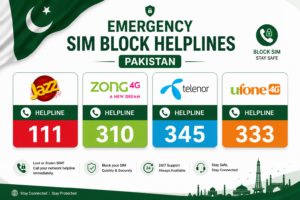
- Call Jazz helpline at 111 from any other mobile or landline
- Tell the representative you want to block SIM card in Pakistan due to loss or theft
- Provide your CNIC number for identity verification
- Your Jazz SIM will be blocked immediately after verification
Let me tell you that Jazz customer service in Pakistan is available 24 hours a day and 7 days a week. You can visit any Jazz Experience Center with your original CNIC or that of your family member and get your SIM blocked on the spot. You can also immediately request a free replacement SIM with the same number.
How to Block SIM Card in Pakistan on Zong
Zong is China Mobile’s network in Pakistan, and let me tell you that it is one of the fastest growing mobile networks in the country. So if your Zong SIM card or the SIM card of any of your family members has been lost, follow all the steps given below to block it.
- Call Zong helpline at 310 from any phone
- Choose the option for lost or stolen SIM from the menu
- Verify your identity using your CNIC number
- Your Zong SIM card will be blocked right away
Zong has franchise centers in almost all cities across Pakistan where you can visit with your CNIC and get your SIM blocked on the spot. The good thing is that you can also get a new replacement SIM immediately.
How to Block SIM Card in Pakistan on Telenor
Now that we have talked about Zong and Jazz, how can we forget Telenor? Telenor has one of the best and fastest customer service systems in Pakistan. So if you need to block your Telenor SIM card in Pakistan, follow the steps given below carefully.
- Call Telenor helpline at 345 from any network
- Inform the customer service agent about your lost or stolen SIM
- Share your CNIC details for identity verification
- The SIM blocking process will be completed immediately
Telenor customers can also use the My Telenor App available on Android and iOS to report a lost SIM and request a block directly from their smartphone without calling anyone.
How to Block SIM Card in Pakistan on Ufone
Now that we have talked about so many networks, how can we forget Ufone? Ufone is one of the oldest and most popular mobile networks in Pakistan. The process of blocking a SIM on Ufone is also very simple. So if your Ufone SIM ever gets lost or has already been lost, follow the simple steps given below to block it.
- Call Ufone helpline at 333 from any phone
- Choose the lost or stolen SIM option from the automated menu
- Provide your CNIC number for identity verification
- Your SIM will be blocked after successful verification
Ufone subscribers can also visit any Ufone customer service center with their original CNIC to block and replace their SIM card on the spot.
How to Block SIM Through PTA
If both your phone and SIM card have been stolen, then PTA (Pakistan Telecommunication Authority) comes in, through which you can get your SIM blocked. PTA also provides this service. This method is especially useful when your phone and SIM suddenly get lost or are stolen together.
- Visit the official PTA website at pta.gov.pk
- Go to the Consumer Support section
- Submit a complaint about your lost or stolen SIM
- PTA will coordinate with your network to block the SIM
You can also call PTA helpline at 0800-55055 (toll free) to report a lost SIM card and get assistance from the regulatory authority directly.
What to Do After You Block Your SIM Card
Blocking your SIM after it gets lost or stolen is a very good step, but it is only the first step. Once your SIM has been blocked, there are still a few important things you should do next to keep yourself fully protected.
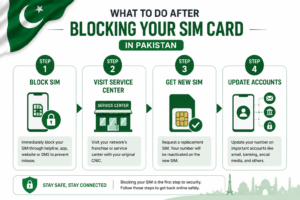
- Visit the nearest service center of your network with your original CNIC to get a replacement SIM with the same number
- Change passwords of your bank accounts, email, and social media accounts as a precaution
- Inform your contacts that your number was temporarily compromised
- If your phone was also stolen, file a report at the nearest police station
- Check your NADRA CNIC status online to make sure your identity documents are in order
Most networks in Pakistan will issue a replacement SIM with your same number within a few hours of your request.
Tips to Protect Your SIM Card
My dear brothers and sisters, prevention is always much better than solving the problem later. So below are some simple and useful tips that can help you keep your SIM card safe, protect the SIM cards of your family members, and avoid reaching the point where you have to block your SIM.
- Always save your mobile network helpline number in another device or write it down somewhere safe
- Enable SIM lock or PIN on your phone so that no one can use your SIM without the PIN
- Never share your CNIC number with strangers or unknown callers
- Keep a photocopy of your CNIC in a safe place so you can verify your identity quickly in emergencies
- Make sure all SIM cards registered in your name are actually in your possession — you can check this on the PTA DIRBS portal
Final Thoughts
So, knowing how to block a SIM card in Pakistan can save you and your family from a lot of trouble during emergencies. Whether you use Jazz, Zong, Telenor, or Ufone in Pakistan, the good thing is that the process is quick, free, and available at all times.
The moment you realize that your SIM card is missing, do not waste even a single second. Immediately use any nearby phone and contact your network helpline because protecting your security and privacy is very important.
If you found this guide helpful, make sure to share it with your friends and family so they can stay prepared too. And if you still have any questions, feel free to leave a comment below.