Earlier in Pakistan, sending money to family or friends meant going to the bank, waiting in long queues, and only then the transfer could be completed. But today, all of this has become much easier through Easypaisa and can be done in just a few taps on your phone.
Whether you want to send money to another mobile number, receive money, transfer to a bank account, or use an Easypaisa shop, this complete guide explains everything you need to know.
Easypaisa is Pakistan’s most widely used mobile wallet, operated by Telenor Microfinance Bank. With millions of active users across the country, it has become the go-to solution for digital payments and money transfers.
How to Create an Easypaisa Account
Before transferring money through Easypaisa in Pakistan, you or one of your family members must have an active account. To get started, follow the steps given below.
- Download the Easypaisa App from Google Play Store or Apple App Store
- Open the app and tap Register
- Enter your Telenor or any other network mobile number
- Verify your number with the OTP code received via SMS
- Enter your CNIC number for full account verification
- Set a secure PIN for your account
After creating your Easypaisa account and completing the verification process, you can immediately start receiving and transferring money. In addition, if you want to get a fully verified Easypaisa account, you can visit any Easypaisa shop with your original CNIC and complete the verification process there.
How to Transfer Money with Easypaisa to Mobile Number
The fastest way to transfer money with Easypaisa is directly to another mobile number. Here is the step by step process:
- Open the Easypaisa App on your phone
- Enter your PIN to login
- Tap on Send Money from the home screen
- Select To Mobile Number
- Enter the recipient’s mobile number
- Enter the amount you want to send
- Review the details carefully
- Tap Confirm to complete the transfer
Whenever you send money to anyone through Easypaisa, the amount will be transferred instantly to the recipient’s Easypaisa account. After the transfer is completed, both you and the recipient will receive an SMS confirmation for the transaction.
How to Transfer Money with Easypaisa to Bank Account
You can also transfer money with Easypaisa directly to any bank account in Pakistan. This feature is especially useful for sending money to people who do not use Easypaisa. Here is how:
- Open the Easypaisa App and login with your PIN
- Tap on Send Money from the home screen
- Select To Bank Account
- Choose the recipient’s bank from the list
- Enter the recipient’s IBAN number
- Enter the amount you want to transfer
- Confirm the details and tap Send
Bank transfers through Easypaisa are processed within a few hours. Some transfers may take up to one business day depending on the receiving bank.
How to Transfer Money Over the Counter
If you do not have a smartphone or prefer in-person transactions, you can transfer money with Easypaisa at any Easypaisa shop across Pakistan. This is also called an OTC or Over the Counter transfer.
- Visit the nearest Easypaisa shop in your area
- Tell the shopkeeper you want to send money
- Provide the recipient’s mobile number and the amount
- Show your original CNIC for verification
- Pay the amount plus any applicable service charges
- You will receive a confirmation SMS once the transfer is complete
There are over 200,000 Easypaisa shops across Pakistan, making it one of the most accessible money transfer services in the country. You can find the nearest Easypaisa shop using the Easypaisa official website.
How to Transfer Money Using USSD Code
Even without internet, you can transfer money with Easypaisa using a simple USSD code. This method works on any basic mobile phone:
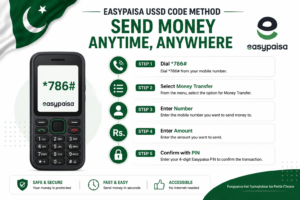
- Dial *786# from your Telenor number
- Select Money Transfer from the menu
- Enter the recipient’s mobile number
- Enter the amount
- Enter your Easypaisa PIN to confirm
- You will receive a confirmation SMS instantly
This method is perfect for areas with limited internet connectivity. As long as you have mobile signal, you can complete your transfer.
Easypaisa Transfer Limits and Charges
Before you transfer money with Easypaisa, it is important to know the transfer limits and charges:
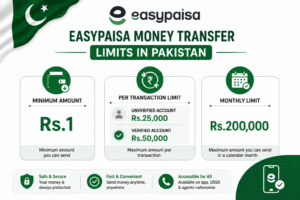
- Minimum transfer amount: Rs. 1
- Maximum per transaction: Rs. 25,000 (unverified) / Rs. 50,000 (verified)
- Monthly limit: Rs. 200,000 for verified accounts
- Transfer charges: Vary by transaction type — app transfers are often free or very low cost
For the most up to date information on charges and limits, visit the official Easypaisa website or call their helpline at 3737.
Tips for Safe Money Transfers
Keeping your money safe while using Easypaisa is just as important as knowing how to transfer it. Here are some simple tips:
- Never share your Easypaisa PIN with anyone — not even Easypaisa customer service representatives
- Always double check the recipient’s mobile number before confirming the transfer
- Use a strong PIN that is not easy to guess
- Enable biometric login on the Easypaisa app for extra security
- If you lose your phone, call 3737 immediately to block your account
- Only use official Easypaisa shops for over the counter transactions
You should also make sure your SIM card is secure. If your SIM is ever lost or stolen, read our guide on how to block SIM card in Pakistan immediately to protect your Easypaisa account.
Final Thoughts
Learning how to transfer money through Easypaisa can make life much easier for you and your family. Whether you are living in another city and sending money back home, making a payment to someone, or transferring funds to a bank account, Easypaisa makes the whole process fast, simple, and secure.
With millions of users and thousands of Easypaisa shops across Pakistan, it has become one of the most trusted services for sending and receiving money. Start using the app today and enjoy the convenience of digital money transfers.
If you found this guide helpful, make sure to share it with your friends and family so they can benefit too. And if you still have any questions, feel free to leave a comment below.