Managing your finances from your phone has never been easier in Pakistan. If you want to send money, pay bills, or shop online without visiting a bank, the first thing you need is a digital wallet. Knowing how to create JazzCash account on mobile is one of the most useful skills you can have in today’s digital world.
JazzCash is one of the largest and most popular mobile financial services in Pakistan, operated by Jazz. With more than 30 million registered users — including people like you and me — it gives you access to a wide range of financial services directly from your smartphone.
And the best part is that you do not even need to have a bank account to use it.
What You Need to Create JazzCash Account on Mobile
Before you create JazzCash account on mobile, make sure you have the following ready:
- A Pakistani mobile number — any network works, not just Jazz
- Your original CNIC number for identity verification
- A smartphone with Android or iOS
- A stable internet connection for downloading the app
If you or your family members already have all of these things ready, the registration process becomes much easier and smoother. The good thing is that the entire process only takes a few minutes to complete.
Step by Step Guide to Create JazzCash Account on Mobile
Here is exactly how to create JazzCash account on mobile from scratch:
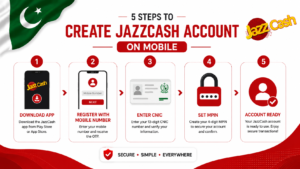
Step 1 — Download the JazzCash App
- Open Google Play Store on Android or App Store on iPhone
- Search for JazzCash
- Download and install the official JazzCash app
Step 2 — Open the App and Register
- Open the JazzCash app after installation
- Tap on Register / Sign Up
- Enter your mobile number and tap Next
- You will receive an OTP code via SMS
- Enter the OTP to verify your mobile number
Step 3 — Enter Your CNIC Details
- Enter your 13-digit CNIC number
- Enter your CNIC expiry date
- Tap Next to continue
Step 4 — Set Your MPIN
- Create a 5-digit MPIN for your account
- This PIN will be used for all future transactions
- Choose a PIN that is easy for you to remember but hard for others to guess
- Confirm your MPIN and tap Submit
Step 5 — Account Created Successfully
- Your JazzCash account is now active
- You will see your account dashboard with your balance
- You can now start using all JazzCash services
That is all it takes to create JazzCash account on mobile. The process is completely free and takes just a few minutes from start to finish.
How to Verify Your JazzCash Account
When you first create JazzCash account on mobile, you get a basic account with limited features. To unlock all features and higher transaction limits, you need to verify your account fully.
Biometric Verification
- Visit any Jazz franchise or JazzCash agent near you
- Bring your original CNIC
- The agent will complete your biometric verification on the spot
- Your account will be upgraded to a fully verified account immediately
Why Full Verification Matters
- Higher daily and monthly transaction limits
- Access to all JazzCash features including loans and savings
- Ability to link your bank account
- Eligibility for JazzCash debit card
For more information about JazzCash verification, visit the official JazzCash website.
Key Features of JazzCash Account
Once you create JazzCash account on mobile, you get access to a wide range of useful features:

- Send and Receive Money — Transfer money to any mobile number in Pakistan instantly
- Bill Payments — Pay electricity, gas, water, and telephone bills from your phone
- Mobile Top-Up — Load credit on any network directly from the app
- Online Shopping — Pay at thousands of online stores using JazzCash
- Bank Transfer — Send money directly to any bank account in Pakistan
- JazzCash Debit Card — Use your wallet balance at any shop or ATM
- Loan Services — Access microfinance loans directly through the app
You can also check your remaining MBs and mobile balance through the Jazz app. Read our guide on how to check remaining MBs in Pakistan for more details.
JazzCash Account Limits and Charges
After you create JazzCash account on mobile, here are the key limits to keep in mind:
- Basic account daily limit: Rs. 25,000
- Verified account daily limit: Rs. 50,000
- Monthly transaction limit: Rs. 500,000 for verified accounts
- Account opening: Free
- Money transfer charges: Vary by transaction type and amount
For detailed and updated information on all charges, always refer to the JazzCash official website or contact their helpline at 4444.
Tips for Using JazzCash Safely
Once you create JazzCash account on mobile, keeping it secure is very important. Here are some essential safety tips:
- Never share your MPIN with anyone — not even JazzCash customer service
- Always log out of the app when you are not using it
- Enable fingerprint or face lock on the JazzCash app for extra security
- If you suspect unauthorized access, change your MPIN immediately
- Only download JazzCash from the official Google Play Store or Apple App Store
- Be careful of scam calls claiming to be from JazzCash — the company never asks for your PIN
Final Thoughts
Learning how to create JazzCash account on mobile is one of the best things you can do to make your financial life easier in Pakistan. From sending money and paying bills to shopping online and accessing loans, JazzCash puts everything in the palm of your hand.
The registration process is free, quick, and available to anyone with a Pakistani mobile number and CNIC. So if you have not already set up your JazzCash account, there is no better time to start than today.
If this guide helped you, please share it with friends and family. And if you have any questions about how to create JazzCash account on mobile, feel free to drop them in the comments below.