Finding the best free antivirus apps for Android is more important than ever in 2026. Hackers, fake apps, phishing links, and malware are becoming more common every day — and Android phones are the number one target. In Pakistan, where millions of people download apps from unknown sources, use public WiFi, and click on suspicious WhatsApp links, having a reliable antivirus app on your phone is no longer optional. It is a basic necessity.
The good news is that you do not need to spend any money. There are several excellent free antivirus apps for Android that provide real protection without any hidden charges. In this guide, we have reviewed and listed the 10 best free antivirus apps for Android in Pakistan for 2026 — so you can pick the right one for your phone.
- Why You Need Antivirus on Android in Pakistan
- 1. Bitdefender Antivirus Free
- 2. Avast Mobile Security
- 3. AVG Antivirus
- 4. Kaspersky Security and VPN
- 5. Malwarebytes Mobile Security
- 6. Norton Mobile Security
- 7. McAfee Mobile Security
- 8. Avira Security Antivirus
- 9. ESET Mobile Security
- 10. Google Play Protect (Built-In)
- Quick Comparison Table
- Tips to Stay Safe on Android
- Frequently Asked Questions
Why You Need Antivirus on Android in Pakistan
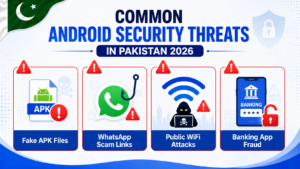
Many people think Android phones are automatically safe. This is not true. While Google does provide basic protection through Play Protect, it is not enough on its own — especially for users in Pakistan who face specific threats that a dedicated antivirus handles much better.
- Fake APK files — Many Pakistanis download apps from outside the Play Store. These APK files can contain hidden malware that steals your data or drains your balance.
- WhatsApp phishing links — Fake prize links, survey scams, and job fraud links sent on WhatsApp groups are extremely common in Pakistan. Antivirus apps can detect and block these.
- Public WiFi risks — Free WiFi at restaurants, universities, and shopping centers can be used by hackers to intercept your data.
- Banking app fraud — JazzCash and Easypaisa users are frequent targets. Antivirus apps protect against keyloggers and screen recorders that try to steal your banking details.
Now let us look at the 10 best free antivirus apps for Android that provide real protection against all these threats.
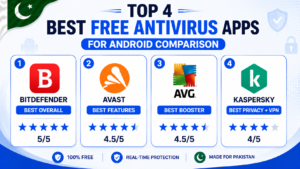
1. Bitdefender Antivirus Free — Best Overall Protection
Bitdefender is consistently rated as one of the best free antivirus apps for Android by independent security labs around the world. It offers real-time virus scanning without slowing down your phone — which is a huge advantage for budget Android phones in Pakistan.
Key features:
- Real-time malware and virus scanning
- Automatic scanning of new apps on install
- Web protection against phishing and fraud sites
- Extremely lightweight — barely uses any battery or RAM
- No ads in the free version
Best for: Users who want powerful protection without any impact on phone performance. Ideal for budget phones with limited RAM.
Available on: Google Play Store — Free
2. Avast Mobile Security — Best for Extra Features
Avast is one of the most popular antivirus brands in the world and their Android app is packed with useful features in the free version. It goes beyond just virus scanning and includes several tools that are genuinely useful for Pakistani users.
Key features:
- Real-time virus and malware protection
- App lock — protect WhatsApp and banking apps with PIN
- WiFi security scanner — checks if your WiFi is safe
- Photo vault — hide private photos behind a PIN
- Junk cleaner and RAM booster built in
Best for: Users who want an all-in-one security and utility app. The app lock feature alone is very popular among Pakistani users.
Available on: Google Play Store — Free (with optional paid upgrade)
3. AVG Antivirus — Best for Performance Boost
AVG Antivirus is made by the same company as Avast and offers similar protection with a slightly different interface. AVG is particularly popular because it includes a built-in performance booster that helps speed up slow Android phones along with virus protection.
Key features:
- Virus, malware, and spyware scanning
- App permission scanner — shows which apps access your camera and mic
- Built-in phone booster and junk cleaner
- Anti-theft features — lock and locate your phone remotely
- Real-time scanning of downloaded files
Best for: Users who want antivirus protection combined with phone optimization tools. If you have a slow phone and want to speed up slow Android phone while also staying protected, read our complete guide on how to speed up slow Android phone fast.
Available on: Google Play Store — Free (with optional paid upgrade)
4. Kaspersky Security and VPN — Best for Privacy
Kaspersky is a globally trusted name in cybersecurity and their Android app offers excellent free protection with a focus on privacy. The free version includes basic but solid antivirus scanning plus a limited VPN — which is very useful for Pakistani users who want to browse privately.
Key features:
- Real-time malware and virus protection
- Safe browsing — blocks dangerous websites automatically
- 200MB daily free VPN included
- Anti-phishing protection for links and emails
- QR code scanner with safety check
Best for: Users who care about online privacy and want basic VPN access along with antivirus. The 200MB daily free VPN is enough for checking emails and light browsing securely.
Available on: Google Play Store — Free (with optional paid upgrade)
5. Malwarebytes Mobile Security — Best for Malware Removal
Malwarebytes is the best choice if you already suspect your Android phone has been infected and want to clean it. It is specifically designed for detecting and removing malware, adware, and spyware that other antivirus apps sometimes miss.
Key features:
- Deep scan for hidden malware and adware
- Detects pre-installed bloatware on budget phones
- Scans for ransomware and spyware
- Privacy audit — shows which apps have excessive permissions
- Lightweight with very low battery impact
Best for: Users who think their phone is already infected, or anyone who frequently downloads APK files from outside the Play Store. This is the most powerful malware remover in our list.
Available on: Google Play Store — Free (30-day premium trial)
6. Norton Mobile Security — Best Brand Reputation
Norton is one of the most trusted antivirus brand names in the world. Their Android app offers solid protection with a clean and easy-to-use interface that is perfect for less tech-savvy users in Pakistan.
Key features:
- Real-time device security scanning
- Web protection against phishing and unsafe sites
- WiFi security alerts on unsafe networks
- Dark web monitoring (paid feature)
- Simple one-tap scan interface
Best for: Users who prefer a big trusted brand and want a simple, easy-to-use security app without complicated settings.
Available on: Google Play Store — Free trial available
7. McAfee Mobile Security — Best for Anti-Theft
McAfee is another globally recognized security brand and their Android app has one of the best anti-theft feature sets available for free. If phone theft is a concern — which it is for many people in Pakistan — McAfee is worth considering.
Key features:
- Antivirus and malware scanning
- Remote lock and wipe if phone is stolen
- Location tracking for lost or stolen phones
- SIM card change notification alert
- Battery and storage optimizer
Best for: Users who want strong anti-theft features along with antivirus. The SIM change alert is particularly useful — you get notified immediately if someone puts a different SIM in your phone after stealing it.
Available on: Google Play Store — Free (with optional paid upgrade)
8. Avira Security Antivirus — Best Clean Interface
Avira offers one of the cleanest and most pleasant interfaces among free antivirus apps for Android. It is straightforward to use, not cluttered with ads, and provides reliable protection backed by solid German engineering.
Key features:
- Real-time virus and malware protection
- App permission manager — review and control app permissions
- Identity protection — alerts if your email is in a data breach
- VPN with 100MB daily free data
- Clean minimal interface with no annoying popups
Best for: Users who want a clean, ad-free antivirus experience without being bombarded with upgrade prompts. Good choice for people who find other security apps too cluttered.
Available on: Google Play Store — Free (with optional paid upgrade)
9. ESET Mobile Security — Best for Advanced Users
ESET is well-known in the professional cybersecurity world and their Android app is one of the most technically advanced free security options available. It gives you detailed control over security settings — perfect for users who want more than just a basic scan.
Key features:
- Proactive anti-malware with regular definition updates
- Anti-phishing and anti-theft features
- Security audit — detailed report of device vulnerabilities
- App lock with fingerprint support
- 30-day premium trial with full features
Best for: Advanced users who want detailed control and reporting. ESET gives you much more information about what it finds and why — great for users who want to understand their phone’s security status in detail.
Available on: Google Play Store — Free (30-day premium trial)
10. Google Play Protect — Best Built-In Option
Google Play Protect is already installed on every Android phone and runs automatically in the background. While it is not as powerful as dedicated antivirus apps, it provides a solid baseline level of protection that every Android user in Pakistan already has — and many do not even know about it.
Key features:
- Automatically scans all apps installed from Play Store
- Warns you before installing harmful apps from unknown sources
- Sends alerts if any installed app behaves suspiciously
- Find My Device feature to locate lost phone
- Completely free and built into every Android phone
How to check if Play Protect is active:
- Open Google Play Store
- Tap your Profile icon
- Tap Play Protect
- Make sure it is turned ON and run a manual scan
Best for: Users who do not want to install any extra app and just want to make sure their built-in protection is active and working.
Quick Comparison Table
| App Name | Best For | Free VPN | App Lock |
|---|---|---|---|
| Bitdefender | Overall Protection | No | No |
| Avast | Extra Features | Yes | Yes |
| AVG | Performance Boost | Yes | Yes |
| Kaspersky | Privacy + VPN | Yes (200MB) | No |
| Malwarebytes | Malware Removal | No | No |
| Norton | Brand Trust | No | No |
| McAfee | Anti-Theft | No | No |
| Avira | Clean Interface | Yes (100MB) | No |
| ESET | Advanced Users | No | Yes |
| Play Protect | Built-In Basic | No | No |
Tips to Stay Safe on Android in Pakistan
Even with the best free antivirus apps for Android installed, following these safe habits makes a huge difference:
- Never download APK files from unknown websites — Only install apps from the Google Play Store or official brand websites. Fake APKs are the biggest source of malware in Pakistan.
- Do not click suspicious WhatsApp links — If a link promises free prizes, free data packages, or free shopping vouchers — it is almost certainly a scam. Never click these links.
- Keep your phone storage clean — Junk files and low storage can affect your antivirus app performance. Read our guide on how to free up storage space on Android phone to keep your phone clean and safe.
- Use strong PINs on banking apps — Never use simple PINs like 1234 or 0000 on JazzCash or Easypaisa. Use a random 6-digit PIN and change it every few months.
- Avoid public WiFi for banking — Never open your banking apps on public WiFi. If you must, use a VPN app like Kaspersky or Avira which include free VPN in the antivirus package.
- Review app permissions regularly — Some apps ask for access to your camera, microphone, and contacts without any real reason. Use the permission manager in Avast or AVG to spot these suspicious apps.
Frequently Asked Questions
Do I really need antivirus on Android in 2026?
Yes, especially in Pakistan. Google Play Protect provides basic protection, but it does not catch everything — particularly APK files downloaded from outside the Play Store, phishing links on WhatsApp, and advanced spyware. A dedicated antivirus app adds an important extra layer of protection.
Which is the best free antivirus for Android without ads?
Bitdefender Antivirus Free and Avira Security are the two best options for an ad-free experience in the free version. Both provide solid protection without constantly pushing you to upgrade.
Can antivirus apps slow down my Android phone?
Poorly designed antivirus apps can slow down your phone, but the ones on this list are all well-optimized. Bitdefender is the lightest with virtually zero impact on performance. If your phone is already slow, fix that first — read our guide on how to speed up slow Android phone before installing any security app.
Is Google Play Protect enough or do I need a separate antivirus?
Play Protect is a good baseline but it is not enough on its own. It mainly scans Play Store apps and has limited protection against phishing, fake APKs, and network threats. Installing one of the free antivirus apps from this list alongside Play Protect gives you much stronger protection.
Can I install two antivirus apps at the same time?
No — installing two antivirus apps at the same time is a bad idea. They will conflict with each other, slow down your phone, and may cause false alarms. Pick one app from this list and stick with it.
Are free antivirus apps safe themselves — can they steal data?
The 10 apps on this list are all from reputable global security companies. However, you should always download them directly from the Google Play Store — not from third-party websites. Fake versions of popular antivirus apps do exist and can be malicious.
Final Words
Protecting your Android phone in 2026 does not require spending money. The best free antivirus apps for Android on this list — especially Bitdefender, Avast, and Malwarebytes — provide genuine protection against real threats. Pick the one that matches your needs, install it from the official Play Store, and make sure Google Play Protect is also active as a backup layer.
Stay safe online, avoid suspicious links on WhatsApp, and never download APK files from unknown sources. These simple habits combined with a good antivirus app will keep your phone and your personal data secure.
For more useful Android tips, keep visiting Buzmis — simple tech solutions for everyone in Pakistan.
For independent antivirus test results, visit AV-TEST — the independent IT security institute which regularly tests all major antivirus apps.