If you are looking for the best free video editing apps for Android, you have come to the right place. Finding the best free video editing apps for Android is not always easy because there are hundreds of apps available on the Google Play Store. Many of them are difficult to use, add watermarks to your videos, or require a paid subscription to unlock even the basic features.
In Pakistan, the number of content creators on Instagram Reels, TikTok, and YouTube Shorts is growing every day. That is why choosing one of the best free video editing apps for Android has become more important than ever. The good thing is that you do not have to spend any money to edit professional-looking videos.
In this complete guide, we have tested and reviewed the 10 best free video editing apps for Android in 2026. Whether you are a beginner or an experienced content creator, these best free video editing apps for Android will help you create high-quality videos directly from your Android phone without spending a single rupee.
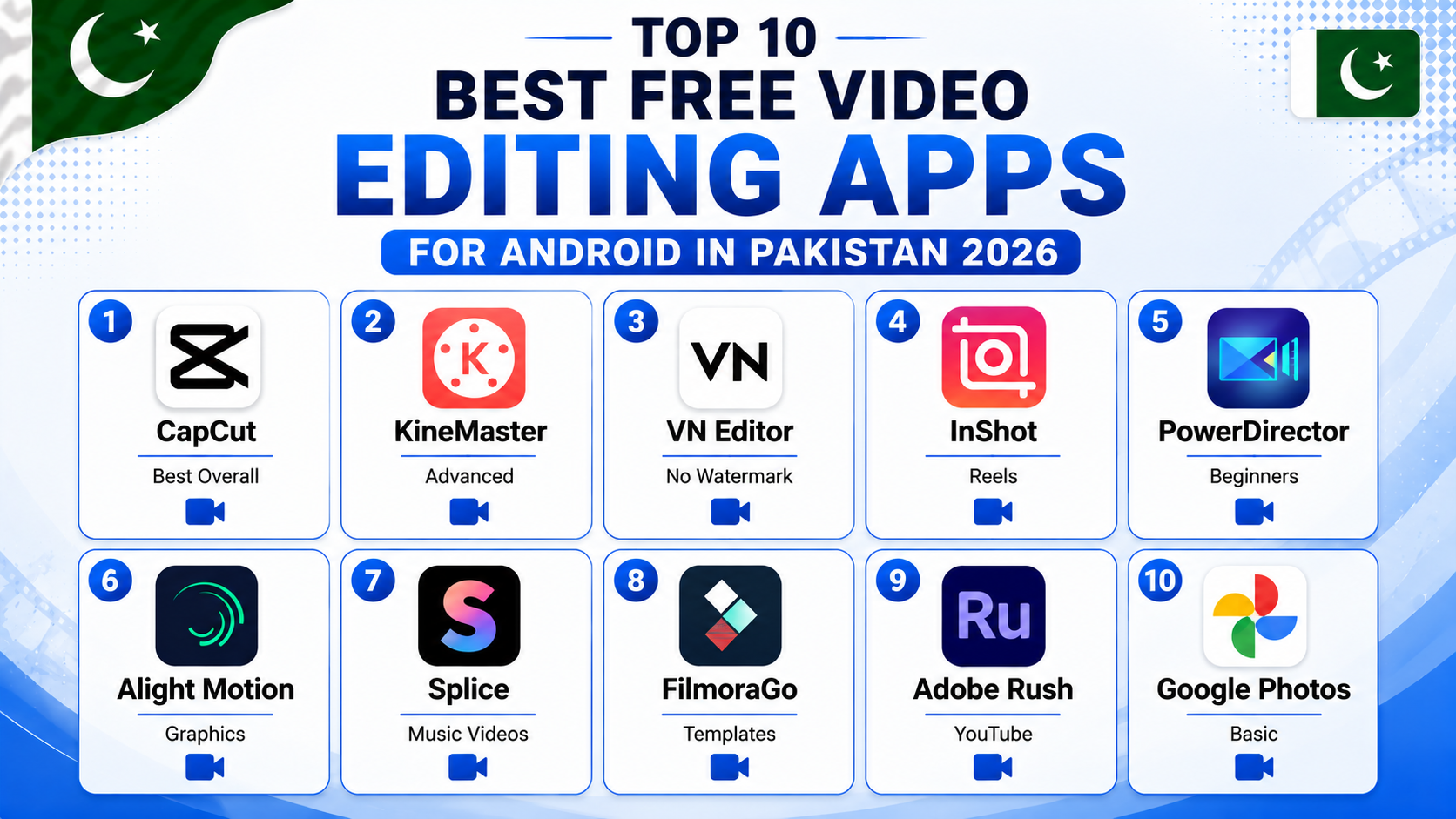
- 1. CapCut — Best Overall Free Video Editor
- 2. KineMaster — Best for Advanced Editing
- 3. VN Video Editor — Best No Watermark App
- 4. InShot — Best for Instagram Reels
- 5. PowerDirector — Best for Beginners
- 6. Alight Motion — Best for Motion Graphics
- 7. Splice — Best for Music Videos
- 8. FilmoraGo — Best Templates
- 9. Adobe Premiere Rush — Best for YouTube
- 10. Google Photos — Best Built-In Editor
- Quick Comparison Table
- Tips for Video Editing on Android
- Frequently Asked Questions
1. CapCut — Best Free Video Editing App for Android
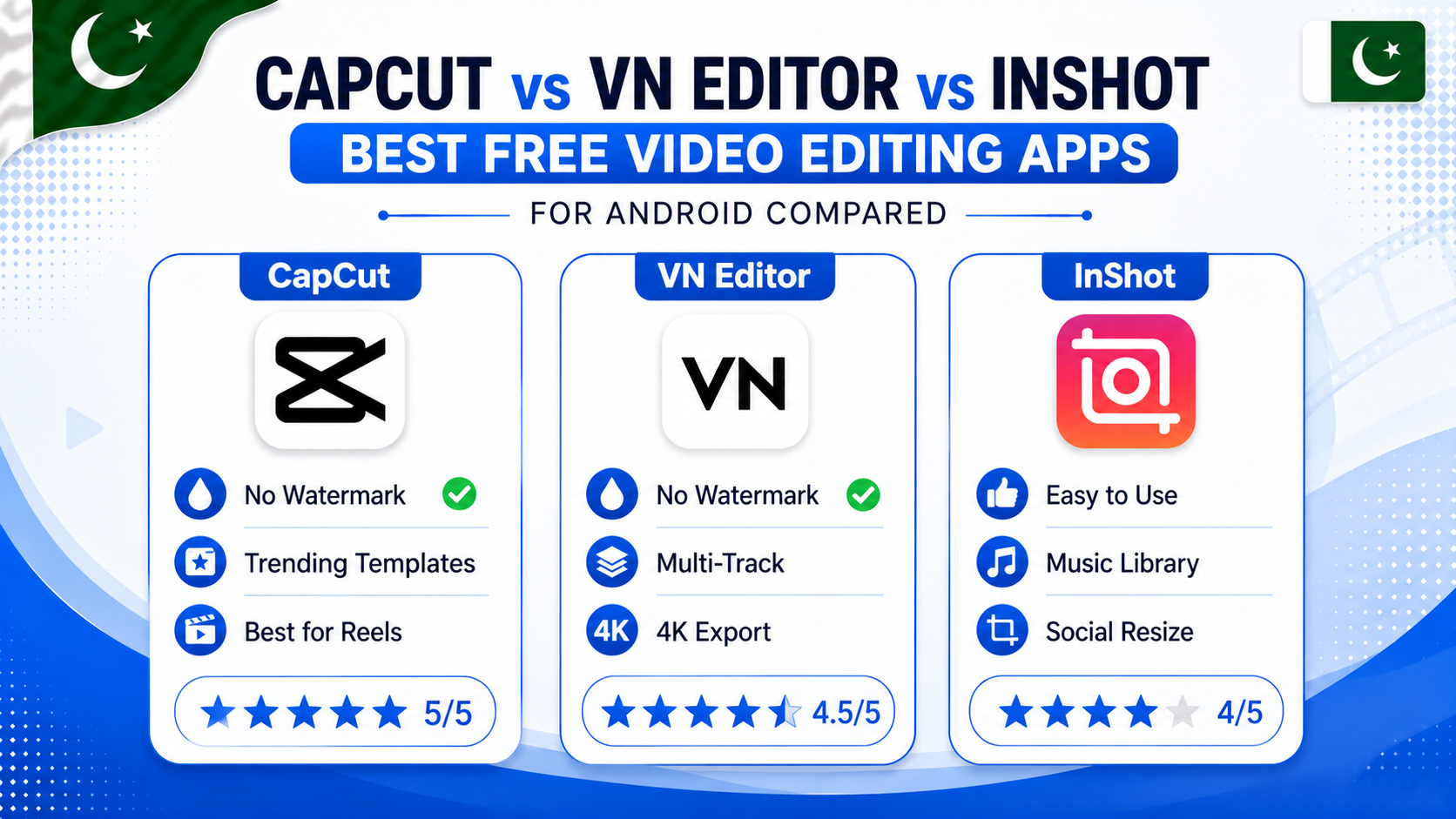
CapCut is one of the best free video editing apps for Android and is currently the most popular choice among content creators in Pakistan. The main reason behind its popularity is that it is developed by ByteDance, the company behind TikTok, and it lets you export videos without adding a watermark.
The good thing is that CapCut offers many powerful editing features completely free of cost. If you are looking for the best free video editing apps for Android to create Instagram Reels, TikTok videos, or YouTube Shorts, CapCut is definitely one of the first apps you should try.
Key features:
- No watermark on exported videos — completely free
- Hundreds of trending templates for Reels and TikTok
- Auto-captions — adds subtitles to your video automatically
- AI background remover and smart cutout tools
- Built-in transitions, effects, filters, and text animations
- Works smoothly on budget Android phones
Best for: Instagram Reels, TikTok videos, and YouTube Shorts creators in Pakistan.
Watermark: None ✅ | Available on: Google Play Store — Free
2. KineMaster — Best for Advanced Video Editing on Android
KineMaster is one of the most powerful video editing apps available on Android. It offers professional-level features that you would normally only find on desktop software — all from your phone.
Key features:
- Multiple video and audio layers for complex edits
- Chroma key (green screen) support
- Precise frame-by-frame editing
- Speed control — slow motion and fast forward
- Large library of free assets, transitions, and effects
Note: The free version adds a KineMaster watermark. To remove it, you need a subscription. However for learning and practice the free version is excellent.
Best for: Creators who want professional editing tools and do not mind the watermark for practice videos.
Watermark: Yes (free version) | Available on: Google Play Store — Free
3. VN Video Editor — Best Free Android Video Editor Without Watermark
VN Video Editor is a hidden gem that most Pakistani creators do not know about. It offers surprisingly powerful editing features with absolutely no watermark — completely free forever.
Key features:
- No watermark — export in full quality for free
- Multi-track timeline editing
- Smooth keyframe animations
- Speed ramping for cinematic slow-motion effects
- Clean minimal interface — easy to learn
- Exports up to 4K resolution
Best for: Creators who want professional results without any watermark and without paying anything.
Watermark: None ✅ | Available on: Google Play Store — Free
4. InShot — Best Free Video Editing App for Instagram Reels
InShot is specifically designed for social media content and is extremely popular among Pakistani Instagram creators. It makes resizing videos for different platforms, adding music, and applying filters incredibly easy.
Key features:
- One-tap resize for Instagram, TikTok, YouTube, and Facebook formats
- Large built-in music library with trending tracks
- Text, stickers, and emoji overlays
- Background blur for portrait-style videos
- Simple timeline that beginners can master in minutes
Note: Free version has a watermark and some features are locked behind a paid plan. But the basic editing tools are free and very useful.
Best for: Pakistani Instagram Reels creators who want quick edits with music and effects.
Watermark: Yes (free version) | Available on: Google Play Store — Free
5. PowerDirector — Best Free Video Editor for Beginners on Android
PowerDirector by CyberLink is one of the most beginner-friendly video editing apps available on Android. It has a guided editing mode that walks you through the process step by step — perfect for people who have never edited a video before.
Key features:
- Guided editing mode for complete beginners
- AI-powered tools — sky replacement, object removal
- Voice-over recording directly in the app
- Slow motion and time-lapse video support
- Large collection of free music tracks and sound effects
Best for: Complete beginners in Pakistan who want a simple and guided video editing experience.
Watermark: Yes (free version) | Available on: Google Play Store — Free
6. Alight Motion — Best Free App for Motion Graphics on Android
Alight Motion is the go-to app for creators who want to add professional motion graphics, animations, and visual effects to their videos. It is more complex than other apps but the results are stunning.
Key features:
- Vector and bitmap animation support
- Professional visual effects and motion blur
- Keyframe animation for smooth movements
- Layer-based editing like desktop software
- Huge community of free presets and templates online
Best for: Creators who make lyrical videos, animated intros, and motion graphic content for Instagram and TikTok.
Watermark: Yes (free version) | Available on: Google Play Store — Free
7. Splice — Best Free Video Editing App for Music Videos on Android
Splice is made by GoPro and is specifically optimized for creating music-driven videos. It automatically syncs your video cuts to the beat of the music — which is perfect for creating Instagram Reels and TikTok videos.
Key features:
- Beat-sync editing — cuts automatically match music beats
- Large royalty-free music library
- Simple drag-and-drop timeline
- Speed adjustment and reverse video effects
- Clean export without complicated settings
Best for: Creators who make music-heavy content and want automatic beat-synced editing.
Watermark: None ✅ | Available on: Google Play Store — Free
8. FilmoraGo — Best Free Video Editor with Templates for Android
FilmoraGo is another one of the best free video editing apps for Android and is especially popular among beginners. It is the mobile version of the well-known Filmora desktop software and comes with a large collection of ready-made templates that make video editing much easier.
The good thing is that you only need to add your photos or video clips, and the template automatically handles most of the editing for you. If you want to create professional-looking videos in just a few minutes, FilmoraGo is one of the best free video editing apps for Android that is definitely worth trying.
Key features:
- Hundreds of trending video templates
- One-tap apply filters and color grading
- Smooth transitions and text animations
- Built-in stock footage and music library
- Export up to 1080p in free version
Best for: Creators who want fast results using ready-made templates without spending time on manual editing.
Watermark: Yes (free version) | Available on: Google Play Store — Free
9. Adobe Premiere Rush — Best Free Video Editing App for YouTube on Android
Adobe Premiere Rush is made by Adobe — the same company behind the industry-standard Premiere Pro. The mobile version is simplified but still offers professional quality exports perfect for YouTube content.
Key features:
- Professional color correction tools
- Multi-track audio editing
- Direct publish to YouTube, Facebook, and TikTok
- Syncs with Adobe Creative Cloud
- Clean modern interface
Note: Free version is limited to a small number of exports per month. For heavy use a subscription is needed. But for occasional YouTube uploads it works well for free.
Best for: YouTube creators in Pakistan who want professional color grading and direct publishing.
Watermark: None ✅ | Available on: Google Play Store — Free (limited exports)
10. Google Photos — Best Built-In Free Video Editor on Android
Many people do not know that Google Photos is also one of the best free video editing apps for Android for basic video editing. It already comes pre-installed on almost every Android phone in Pakistan, which means you do not need to download any extra app to start editing your videos.
The good thing is that Google Photos is completely free, does not add a watermark to your videos, and is very easy to use. While it may not have as many advanced features as other best free video editing apps for Android, it is still a great choice for beginners who want to edit videos quickly and easily.
Key features:
- Trim, crop, and rotate videos
- Color correction — brightness, contrast, saturation
- Auto-enhance with one tap
- Create highlight videos automatically from your memories
- No watermark — completely free
Best for: Users who just need basic editing without downloading any extra app. Great for quick WhatsApp status videos.
Watermark: None ✅ | Available on: Pre-installed on most Android phones — Free
Here is a quick comparison of all the best free video editing apps for Android so you can pick the right one for your needs in Pakistan.
Quick Comparison Table
| App Name | Best For | Watermark Free | Difficulty |
|---|---|---|---|
| CapCut | Reels & TikTok | ✅ Yes | Easy |
| KineMaster | Advanced Editing | ❌ No | Advanced |
| VN Editor | No Watermark | ✅ Yes | Medium |
| InShot | Instagram Reels | ❌ No | Easy |
| PowerDirector | Beginners | ❌ No | Easy |
| Alight Motion | Motion Graphics | ❌ No | Advanced |
| Splice | Music Videos | ✅ Yes | Easy |
| FilmoraGo | Templates | ❌ No | Easy |
| Adobe Rush | YouTube | ✅ Yes | Medium |
| Google Photos | Basic Editing | ✅ Yes | Easy |
Tips for Video Editing on Android in Pakistan
- Use CapCut for Reels and TikTok — It is free, has no watermark, and has all the trending templates already built in. Most viral Pakistani Reels are made with CapCut.
- Save storage before editing — Video editing creates large temporary files. Make sure you have enough free space before starting. Read our guide on how to free up storage space on Android before editing heavy videos.
- Edit on WiFi only — Exporting and uploading high quality videos uses a lot of data. Always do this on WiFi. Read our guide on how to reduce mobile data usage on Android to manage your data while creating content.
- Export at 1080p always — Instagram, TikTok, and YouTube all prefer 1080p videos. Always export at the highest quality your phone supports.
- Use trending audio — Audio is as important as visuals for Reels and TikTok. CapCut and InShot both have built-in trending music libraries that are copyright-free for social media use.
Frequently Asked Questions
Which is the best free video editing app for Android without watermark?
CapCut, VN Video Editor, Splice, and Google Photos are all completely free with no watermark. CapCut is the top choice for social media content while VN Editor is best for more complex editing without any cost.
Can I edit videos on a budget Android phone in Pakistan?
Yes. CapCut, VN Editor, InShot, and Google Photos all work well on budget phones with 3GB or 4GB RAM. Avoid KineMaster and Alight Motion on very low-end phones as they require more processing power.
Is CapCut available in Pakistan?
Yes. CapCut is fully available on the Google Play Store in Pakistan and works without any VPN. It is the most downloaded video editing app in Pakistan right now.
Which free video editing app is best for YouTube videos on Android?
Adobe Premiere Rush and PowerDirector are both excellent for YouTube content. They offer better color grading and audio control compared to apps designed primarily for short-form social media content.
Do free video editing apps use a lot of mobile data?
The apps themselves do not use much data. But uploading finished videos to YouTube or Instagram uses significant data. Always upload on WiFi to avoid burning through your mobile package.
Whether you are a beginner or an experienced creator, these best free video editing apps for Android will help you make professional videos without spending anything.
Final Words
Now you know the 10 best free video editing apps for Android in Pakistan for 2026. For most creators, CapCut is the perfect starting point — free, powerful, no watermark, and full of trending templates. If you need more control without a watermark, VN Video Editor is the best alternative.
Pick one app, learn it well, and start creating. Consistency matters more than having the perfect editing app — the best creators in Pakistan use simple tools but post regularly.
For more useful Android tips keep visiting Buzmis — simple tech solutions for everyone in Pakistan.
For more details about CapCut features visit the official CapCut website.